
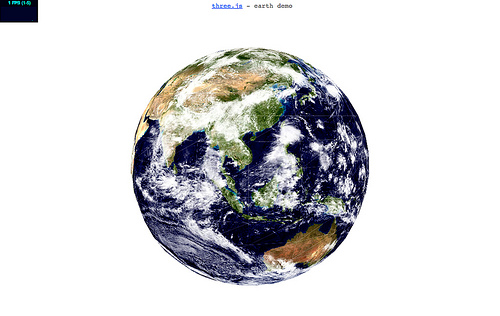
In my last post I mentioned that it should be possible to make a 3D globe in JavaScript using three.js. I was even considering putting it together myself but I didn’t need to because the awesome Mr Doob stepped in to prove it!
Sadly I’m only seeing 1 frame per second right now in both Chrome and Safari – I’m not sure why? I’ll reboot in a moment and try again. But I’d be interested to know how it’s performing for you – apparently the Doobster is getting 28FPS (albeit on Linux/Ubuntu). Let me know.
36 replies on “3D globe in JavaScript with three.js”
On my computer (Macbook Pro 2,4 Ghz Core2Duo, 4GB ram) it’s also only doing 1 FPS.
I’m getting ~1 FPS in Firefox, ~30 FPS in Chrome on Ubuntu. I’m pretty sure that Chrome’s JavaScript engine isn’t 30x faster than Firefox’s, so I suspect something specific is slowing it down..
On my mac I’m using Chrome and am only seeing 1 frame per second. I took a look at the source code and it looks very similar to Papervision3D.
Constant 11FPS on my Windows 7 machine using FF3.6. That’s strange that MACs seems to have a problem here.
MacMini Core 2 Duo 2.53 Ghz, Ubuntu/Linux, Chrome: 30fps
😀
MacBook Pro 15″ i7 8 GB RAM:
Opera 10.6: 41 FPS but:
Globe only round about 300 pixels if mouse on outer left side and even smaller when mouse on the right side. And really horrible drawing errors (Parts of the globe won’t be deleted if the globe scales smaller.
Firefox 3.6.6 and Safari 5: 1 FPS.
25fps, in chrome
9, in firefox
1.7ghz inter core i7
1PFS – OsX 10.6.4 – Chrome / Safary
[…] / Guides « Papervision3D training on Lynda.com 3D globe in JavaScript with three.js […]
I’m getting 10 fps in Firefox 3.6.6 on a Windows 7 machine.
I’m getting 13-15 FPS using Chrome on Vista 2.2GHZ – 2GB ram
I tested in firefox, chrome and safari, in all of then i’m getting 1FPS too (at best). I’m using an imac 2.66ghz 2gb ram
Wow, great work!
I’m getting a solid 15fps – with Vista + FF 3.6
1fps osx 10.6.3 firefox 3.6.6
2.6 Core 2 Duo
2GB DDR3
9 to 11 fps on FF + Vista
I am seeing 33fps in Chrome 6 and 12fps on FF 4
Xeon w3520 2.67GHz, XP SP3
6 FPS in Firefox 4Beta1, 30 FPS in Chrome , Fedora 13
Karl Knocking gets this:
iMac 2.8 GHz Intel Core 2 Duo, 2GB RAM:
1fps on Safari, 1fps on FireFox
Windows 7, 2.4 GHz Intel Core 2 Duo, 4GB RAM:
Chrome: 33fps!! FireFox:10fps
WTF?????
Safari 1fps
Mac Pro
Quad-Core Intel Xeon
2 processor of 2.8 GHz
Memory: 10 GB
Chrome: 14-25 FPS
Windows XP
Intel T7250 Core 2 Duo @ 2.00GHz
3 GB memory
Nice! 🙂
Win7, Chrome 5
cpu core 2 duo @ 1.7Ghz, 2GB ram
15 fps
Getting 15-16 fps in FF4 and a whopping 47 fps in Chrome but that’s likely cause my PC will eat anything 😉 //bit.ly/cSmUGS
Turns out the reason why this runs so slow on MacOS is because Chrome is using Apple’s CoreGraphics instead of Skia (which they use in the Windows/Linux versions).
Of course, Safari also uses CoreGraphics, so it’s up to Apple to improve the performance (unless Google switches from CoreGraphics to Skia, which I suspect it’s unlikely).
Thanks doob, this is a pretty major stumbling block isn’t it! I hope the browser vendors look at fixing this soon.
Well, I would say it’s Apple who should look at fixing it and not the browser vendors…
Good point. I guess CoreGraphics should be faster huh.
It’s probably because Adobe is lazy if it’s slow on OS X… oops, wait, it is not flash. Sorry, my mistake.
On my QUAD CORE It is between 1-2 FPS
great !!!
I have some problem about my pv3d project !!I need your help !
the main question is that how to remove lookAt() method ?
I call the method lookAt () and then I want to remove this method ‘s effect to its original state which I don’t call the lookAt ()
I put some planes on a sphere’s vertice ! and call plane.lookAt(sphere) so all planes will lookAt shpere !all planes will look like a sphere !! when I Tween all planes to form a big cube ! set the properly localRotation XYZ ! all planes
does’t look like a big cube !! when I remove plane.lookAt(shpere) this code ! all planes will look like a big cube!
so I want to use lookAt() method to form a shpere ! but I want to remove the method to form a big Cube !! but when I call lookAt () method ! I don’t kno w how to remove it for cube!! ! so how to remove lookAt () method when it has been called ! !I want to go back to its original state !
sorry for my poor English !! thx!!!!
You could try rotationXYZ instead of localRotation?
1 FPS MacBookPro 2.6GHz Chrome
My minefield 3.74apre is crushed, and minefield4 has 8 FPS.
Win7 dual-core T4400 2.2G, 3G ram and Geforece G102M
I’m getting 12 FPS on firefox 3.6.8 on Windows XP, I have a Core 2 Duo @ 2.80 GHz, 3.489 GB RAM
Smooth on desktop, but over 50%CPU !!! usage for only 1 simple badtextured-unshaded-low poly objet.
1fps on my google phone.
i have check the snow3D and this and i definetly don’t want to see more.
bye
Extremely smooth on Firefox – running Linux Mint Katya
Firefox 11.0 – 18fps
Chrome 18 – 51fps
Opera – (55-63)fps
Windows 7,core i3 first generation
N/B.Firefox JS engine works faster with any LINUX system so you get better result that that of in windows..